1.select any file/folder
2.right click on it and select rename (or you can select the file and then press F2)
3.press and hold "Alt" key. While holding Alt key type '0160' from numpad [notice: this trick doesn't work if press the mentioned number using number keys which are just above the alphabets as they have a different key-value ].
4.press enter/return key , and your nameless file is created.
[note: we all know that every file/folder should have a name 'coz that forms its basic identity. so this topic itself seems like violation of that rule. but actually its not . here the name of the file is actually set to a "space character". n that's why its name is not visible though it certainly has got a name]
now to create another nameless file/folder at the same location:
a->select the file and press F2.
b->hold 'Alt' key and type '0610' from numpad
c->release the Alt key.now without anything else, press and hold the 'Alt ' key again and type '0160' form numpad
4.press enter/return key and a second nameless file/folder is created.
[we ll know that there cant be two files/folders with same name at the same location. here too that rule is obeyed.here we have set the file/folder name to 2 'space-characters'. similarly you can repeat step-c as many times you want {and still all the file/folder will continue to seem nameless}]
Showing posts with label tweak. Show all posts
Showing posts with label tweak. Show all posts
Saturday, June 4, 2011


Saturday, May 14, 2011
hide/unhide a drive-partition from console
this tweak is particularly for windows systems and has been personally tested by me on XP ,Vista and Windows 7.its pretty simple yet interesting.this mischief if done on other's computer, can drive the computer owner nuts to figure it out.there is nothing to be afraid to try this as it is just temporary hiding of a partition while all its contents remain the same.(still i'l recommend you to not to try this on a partition in which you have installed applications).
Steps:-
1.Go to Start-----Run------type "diskpart"
(and hit the enter/return key)This will open a console window in which you can use various diskpart utilities with the help of commands[here you can enter "help" and find more about diskpart commands. to know even more about a particular command enter "help". i.e. "help format"]
2.type "list volume"
and hit enter/return. this will give details of all drives present on your computer.
3.type "select volume [vol_number] "
(for example if my partition(H:) has got a volume_number=3, then to hide this partition i have to first select it typing "select volume 3")
4.finally type "remove letter [vol_letter]
(as for example "remove letter H").now if we close the console window and restart the computer that particular drive-partition wouldn't appear
Steps:-
1.Go to Start-----Run------type "diskpart"
(and hit the enter/return key)This will open a console window in which you can use various diskpart utilities with the help of commands[here you can enter "help" and find more about diskpart commands. to know even more about a particular command enter "help
2.type "list volume"
and hit enter/return. this will give details of all drives present on your computer.
3.type "select volume [vol_number] "
(for example if my partition(H:) has got a volume_number=3, then to hide this partition i have to first select it typing "select volume 3")
4.finally type "remove letter [vol_letter]
(as for example "remove letter H").now if we close the console window and restart the computer that particular drive-partition wouldn't appear
Now to unhide the partition
follow steps 1 to 3 as mentioned before to select a partition/volume (as for here it would be the volume that we have hidden earlier). then step 4 will be:
4.type "assign letter [drive_letter]
example "assign letter M". this will make the partition reappear but with letter M:\ this time.it could have been earlier drive_alphabet too.
example "assign letter M". this will make the partition reappear but with letter M:\ this time.it could have been earlier drive_alphabet too.
[ notice that this tweak can be effectively used to change drive-alphabet too ]
Sunday, May 8, 2011
increase torrent download speed
Simplest tips to increase your torrent download speed:
1.while selecting torrents for downloading ,select ones with greater number of seeds and peers:greater the number of seeds and peers , greater will be the availability and hence you'l get greater average download speed.
2.more the trakers ,more will be the download rate:each torrent is associated with a fixed number of trackers. try to add all the associated trackers.
3.set the maximum-upload rate=1kbps:this can be done by 1. open your torrent application. 2.right click on any torrent present in the que 3.then select "Properties" 4.then set the "maximum upload rate"=1kbps

4.create a firewall-exception rule for the torrent application: for this Windows-7 users click Here, while Windows-XP users click Here .other O.S. users are recommended to take the help of Google (type -create firewall exception rule + name of ur operating system).this will give you o.s. specific steps
5.port-forwarding: your torrent application listens to a particular logical port and it is over this port that it receives all the data.this logical port address should be "port-forwarded" to unblock it.generally certain o.s. processes keep monitoring this port if its not forwarded.the steps to obtain this port address are: 1.open ur torrent application(like utorrent). 2.open options------preferences--------connections. 3.u'l get the address here(i.e the random port number)
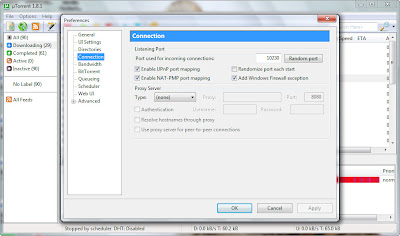
now Windows-XP users click Here while Windows-7 users click Here for port-forwarding related instructions.
1.while selecting torrents for downloading ,select ones with greater number of seeds and peers:greater the number of seeds and peers , greater will be the availability and hence you'l get greater average download speed.
2.more the trakers ,more will be the download rate:each torrent is associated with a fixed number of trackers. try to add all the associated trackers.
3.set the maximum-upload rate=1kbps:this can be done by 1. open your torrent application. 2.right click on any torrent present in the que 3.then select "Properties" 4.then set the "maximum upload rate"=1kbps

4.create a firewall-exception rule for the torrent application: for this Windows-7 users click Here, while Windows-XP users click Here .other O.S. users are recommended to take the help of Google (type -create firewall exception rule + name of ur operating system).this will give you o.s. specific steps
5.port-forwarding: your torrent application listens to a particular logical port and it is over this port that it receives all the data.this logical port address should be "port-forwarded" to unblock it.generally certain o.s. processes keep monitoring this port if its not forwarded.the steps to obtain this port address are: 1.open ur torrent application(like utorrent). 2.open options------preferences--------connections. 3.u'l get the address here(i.e the random port number)

now Windows-XP users click Here while Windows-7 users click Here for port-forwarding related instructions.
Friday, May 6, 2011
run sotwares after they have expired
These days most of the important utility software come under the category of "Sharewares" (i.e. the vendor/manufacturer of the software permits you to download and use the software for free only for a particular period of time). This is interval of time after which these software fail to work is to work is called "trial period".
This allows the vendor not only to advertise its products but also provide hand-on experience to the users.
but that's fine.the problem starts once the software has expired.so how to run them thereafter???
well RunAsDate one such impotant tool which allows you to run applications with back-date settings. thus select any valid date after installation-date of the shareware which has expired.so download this great tool and learn more about it here : RunAsDate
This allows the vendor not only to advertise its products but also provide hand-on experience to the users.
but that's fine.the problem starts once the software has expired.so how to run them thereafter???
well RunAsDate one such impotant tool which allows you to run applications with back-date settings. thus select any valid date after installation-date of the shareware which has expired.so download this great tool and learn more about it here : RunAsDate
Subscribe to:
Posts (Atom)